ME Inbox Service
Description
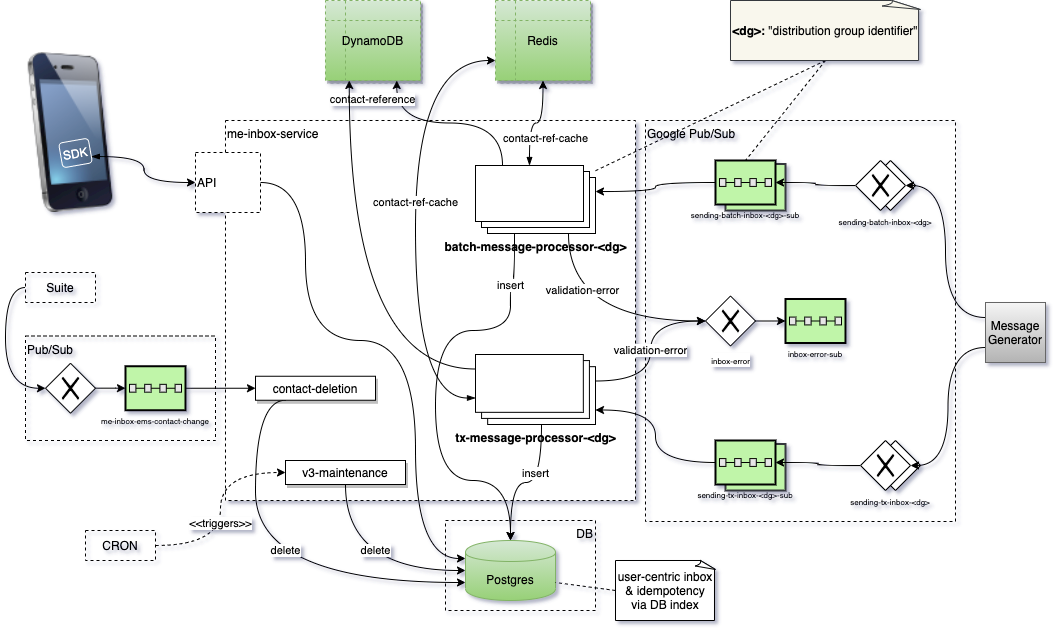
The ME Inbox Service is a service which is deployed and running on Google Cloud Platform. It is split up into several deployments which can be found in the projects gap.json file.
User centric inbox is available for all customers, it uses the contactId for identifying a mailbox which is used to store the messages/notifications for a specific app.
The notifications itself are provided by the ME Message Generator via Google Pub/Sub.
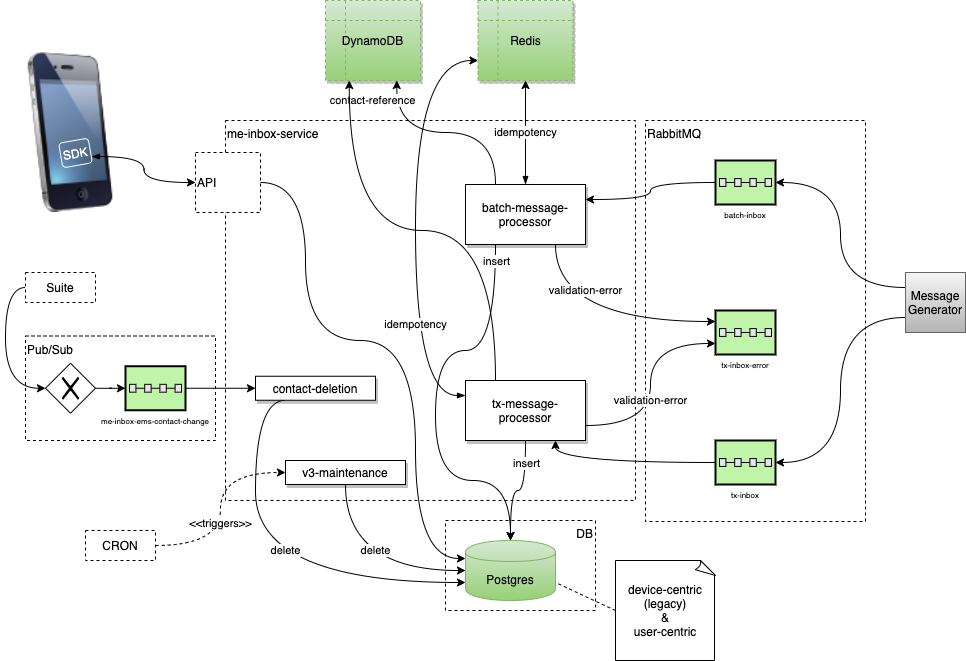
The ME Inbox Services consumes the messages, performs a validity check and puts the notifications into the correct tables. If the validation of a message fails the message is put into
-
an error queue called
tx-inbox-errororbatch-inbox-errorif RMQ is used or -
a single error topic which forwards the message to a connected subscription if Google Pub/Sub is used.
For the new user centric inbox there is a part called v3-maintenance which periodically performs a cleanup of all messages which exceed the limit of a certain inbox.
To fulfill GDPR there are two workers:
-
contact-deletionis listening to a Pub/Sub subscription which is connected to a data platform topic which is used by Suite to report deletion (and other events) of contacts. The worker removes all legacy as well as user centric data which is related to a deleted contact. -
customer-deletionis listening to a Pub/Sub subscription which is connected to a account data topic which is used by Suite to report deletion (only one at this point) of customers. The worker removes all data which is related to a deleted customer.
Inbox
The inbox is user centric based and can only be used by devices which use an SDK version supporting the V3 API of Mobile Engage. The inbox related API part is documented in the interface yaml file. The data of the user centric inbox is currently stored in a single table called inbox. New data is inserted and tags are updated. Fetching of the 25 most recent messages is provided (for Runtastic it’s limited to 100, controlled by MAX_MESSAGES_PER_CUSTOMER flipper). Messages are ordered descending by received_at date.
Applying Tags
The inbox supports tagging of the messages. With this feature it is possible to model any message workflow without the need of a code change because each customer can define the tags by his own. There are also predefined tags which can be used by the customer.
Additionally, special use cases like messages for a specific platform could easily be implemented because setting of tags also can be done for inbox campaigns which means the message is already delivered to a users mailbox with specific tags set. Example: If someone has a message which only shall be displayed on iOS devices, he can specify a tag IS_FOR_IOS_ONLY for the campaign. And when the APP is fetching the messages it could requests only such messages which have set this tag (or vice versa). Please refer also to the pre discovery inbox workshop document.
Apart from setting a tag for a campaign, it is also possible to add or remove tags via events. The events are sent by the SDK as usual to the device event service. Internal events are then formatted and published to data-platform ems-mobile-engage-inapp-event topic, where we have subscription in place for the inbox tag events.
Example format of the inbox tag add event:
The event_name can only be inbox:tag:add or inbox:tag:remove depending on the action.
|
{
    "customer_id": 218524530,
    "application_id": 310,
    "domain": "Emarsys SDK Sample Sandbox",
    "contact_id": 1234567890,
    "event_time": "2021-11-16T10:42:19.077Z",
    "event_attributes":
    {
        "messageId": "123456",
        "tag": "seen",
        "requestId": "b9aa2de9-aac5-41b0-a12e-04e4b09fb213"
    },
    "event_type": "internal",
    "event_name": "inbox:tag:add",
    "hardware_id": "abcdefgh-12345-ijkl-6789",
    "application_code": "EMS4B-8766E",
    "request_time": "2021-11-16T12:06:45.932695Z",
    "platform": "android",
    "sdk_version": "3.1.1-28-g9ecd5ec"
}
Dependencies
The process depends on
-
Postgres: For storing the inbox messages.
-
Google Pub/Sub:
-
Receives the contact deletion events via a specific subscription.
-
Receives the customer deletion events via a specific subscription.
-
Receives the messages which shall be inserted into the inbox via distribution group related subscriptions named
sending-<mode>-inbox-<dg>-sub.<dg>is the name of the distribution group (e.g. dg01, runtastic, …) and<mode>is one oftxorbatch. -
Writes messages which caused an error to the inbox errors topic which forwards the messages to the inbox errors subscription.
-
Artifacts
The ME Inbox Service
-
consumes and adds messages from/to Google Pub/Sub,
-
creates log entries, which are routed to our LaaS logging system,
-
uses the configuration files and related environment variables.
Flippers
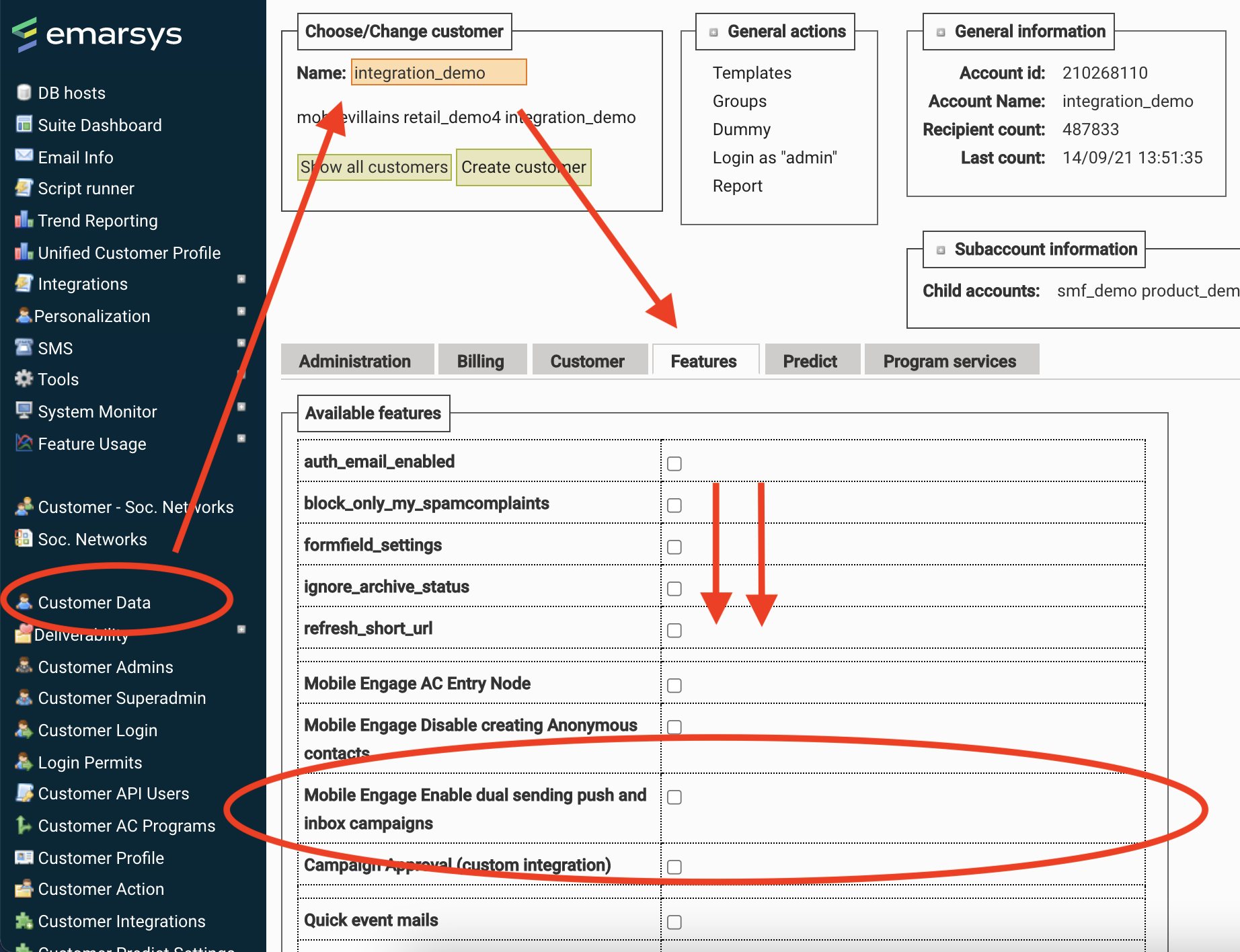
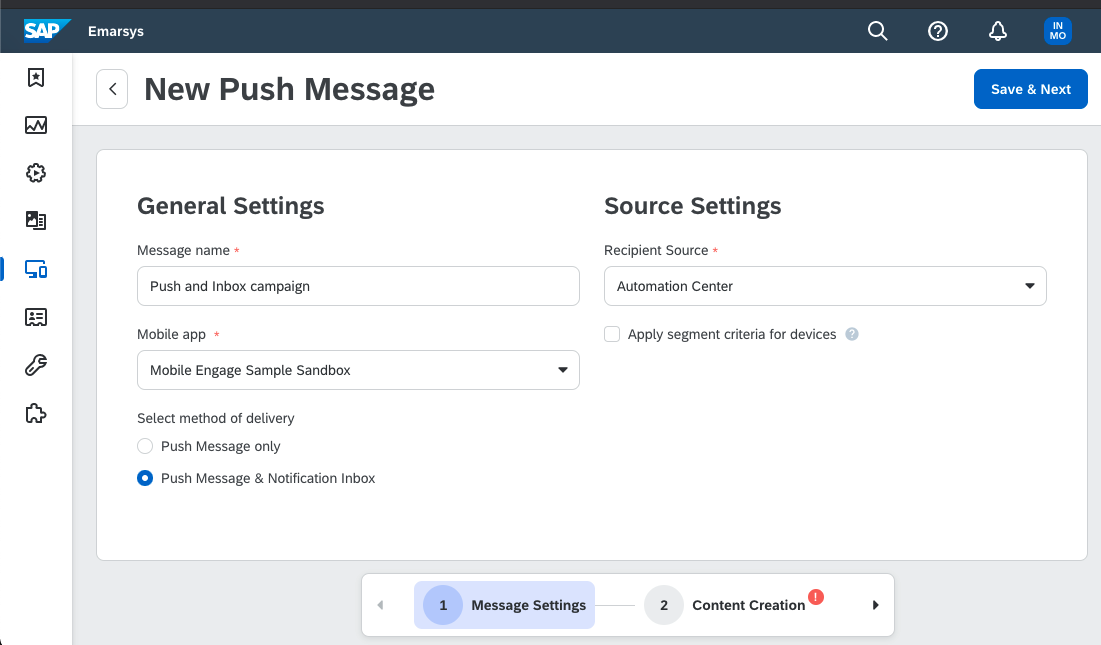
Push and inbox option is controlled by feature flipper Mobile Engage Enable dual sending push and inbox campaigns in EMSAdmin.
Other References & Information
From July 2020 our PM created a new and comprehensive draft about the inbox which is base for the upcoming steps. It contains information about
-
use cases and