Web Push
What is Web Push?
Web Push is about sending a push notification that contacts receive in
-
the desktop browser or
-
mobile browser.
|
Web push notifications are also called browser push notifications or sometimes just push notifications. |
The primary goal of Web Push is to engage with contacts even when they are not on a customer’s web site. This can be achieved, because the push notification message will appear either on the active browser or on the desktop if the browser is minimised.
Normally it is necessary that the web browser is running in order to be able to receive push notifications via Web Push. The exception is Safari on MacOS. For Safari a push notification message will even show up if the browser itself is closed.
|
Web push notifications are not supported on iOS. |
Architecture
Generally Web Push consists of 3 component:
-
A UI part,
-
a backend part and
-
the - so called - Web SDK
The following diagram gives a more detailed overview about the parts which are involved.
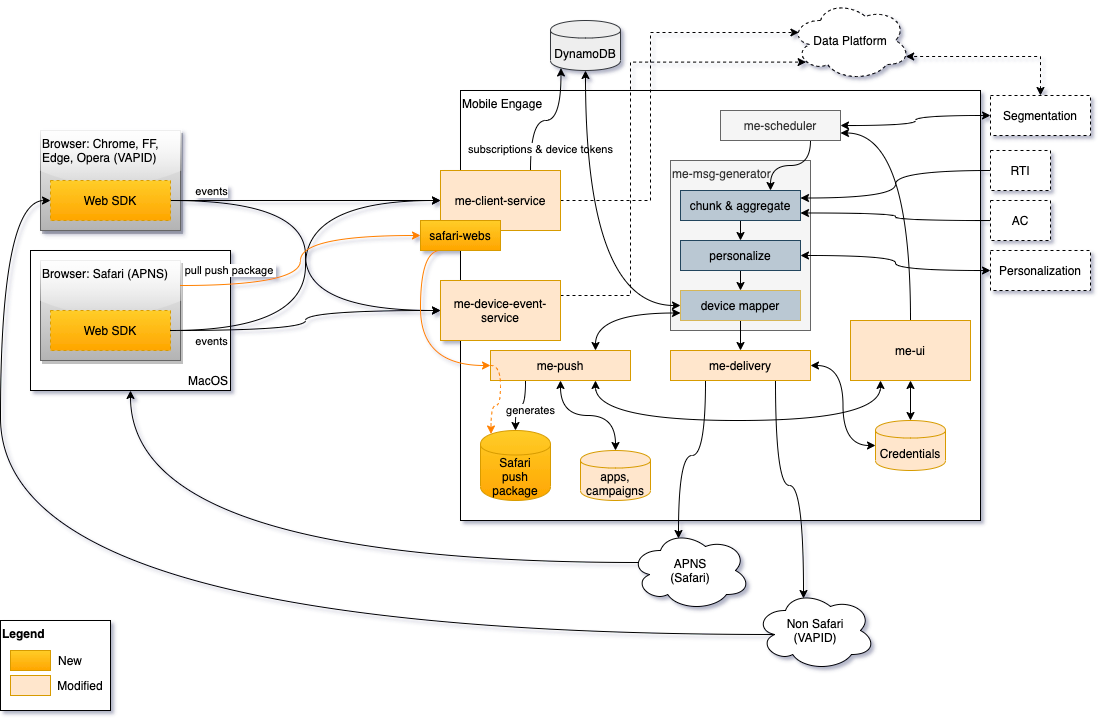
Basically we just extended
-
the existing sending chain of Mobile Engage with the ability to send web push notifications and
-
the Mobile Engage services which are responsible for event handling in order that their API is accessible via web browsers (CORS support).
For Safari browser support
-
new endpoints in the me-client service had to be introduced based on the Apple specification and
-
the endpoints are provided by separated web processes in the
me-clientservice in order to prevent a negative impact on the V3 API webs.
The generated events
-
will be handled by the same infrastructure which is currently handling the Mobile Engage related SDK events and
-
reusing the existing mobile engage tables.
-
is distributed via our CDN (assets.emarsys.net),
-
provides a service worker for non Safari browsers which is responsible for displaying the push notifications as well as handling the clicks/opens.
-
has methods for checking the registration status, browser registration, push token registration, login, logout and for sending of custom events.
|
No changes regarding segmentation need to be done because nothing changes on the data stored in data platform. Our platforms now include the supported browser types. |
Technical Details
-
Web Push is part of Mobile Engage although it is assigned to the Web Channel
-
Mobile Engage development is the owner of Web Push
Dependencies
The dependencies are not extended compared to mobile push and can be seen in the architecture diagram above.
SLAs
There are currently no SLAs we support as there was no such requirement from product side (see also product paper). However, we already measure the sending times for batches and transactional messages and this also includes the times for the web push sends.
Monitoring & Alarming
As we have additional queues which are related to the supported web push platforms, we just extended the existing monitoring for these queues. Similar applies for the workers which are used in connection with the sending. Also here a monitoring is in place which just needs to be extended by the new workers.
Data Usage
For now there is no change on the data which is stored for contacts compared to Mobile Push as only the platform of the data is different. We reuse the existing tables for mobile push in Data Platform for storing the web push related information. No extension on these tables was necessary.
|
In the near future there are plans to separate the mobile push and web push data. |