Safari Web Push
This document contains important information regarding all points which are related using Safari browsers for web push.
The special thing about Safari web push notifications is that the Apple Push Notifications Service is used to send notifications to website users, right on their Mac desktop — even when Safari isn’t running. Additionally web push to Safari browsers on mobile (iOS) devices is not supported. The integration of this is very complex compared to non Safari browsers. Therefore Apple provides a separate extensive documentation.
Asking the User for Push Permission
As with other browsers, with Safari you have to ask the user for permission to deliver
and display push notifications. The browser provides the safari.pushNotification.requestPermission
method for this purpose. Here you have to pass
-
the URL under which the so-called push package (see Safari Push Packages) is located,
-
the ID of the website that you registered with Apple.
|
Safari does not allow to call the |
Safari Push Packages
If "Asking the User for Push Permission" is initiated within the code, the Safari browser is asking a web server for a so called push package. This package contains data that is used by the notification UI, such as the website name and icon, as well as a cryptographic signature. The signature verifies that a notification hasn’t been intercepted by a man-in-the-middle attack and that it is indeed coming from the trusted source.
The push package contains a website JSON dictionary, a set of icons (referred to as an iconset), a manifest, and a signature (for more information refer to the Apple documentation).
As we have plenty of different customers and each of them has a different set up for the push package we had to find a solution how we can assemble and finally provide the push package for each of our customers. The how is described in the following chapter(s).
Technical Solution
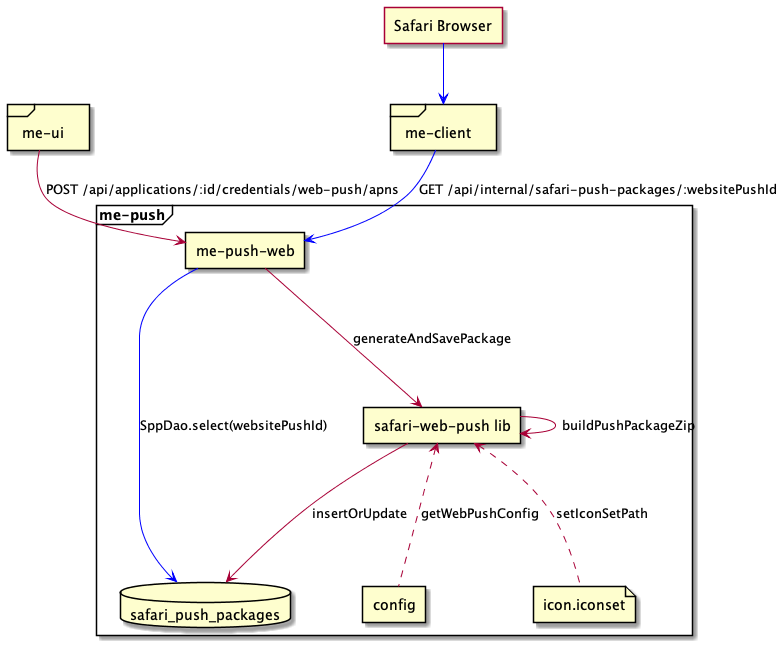
As the image above shows, the push package building is initiated whenever the user of the ME UI is updating or creating the web push APNS credentials.
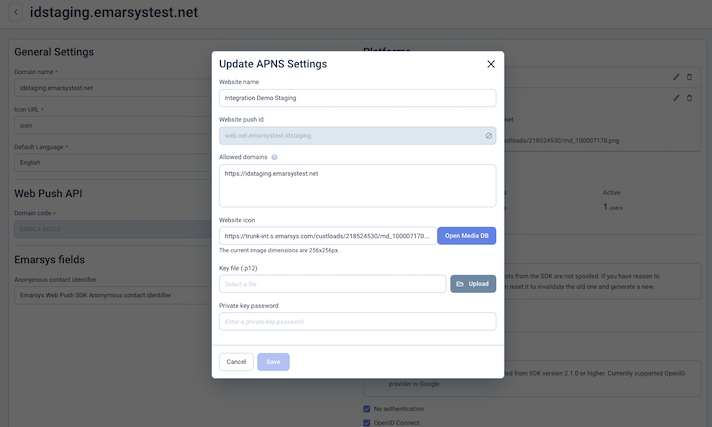
In this case, the UI is triggering an endpoint in the push notification service which:
-
Collects information like the .p12 certificate (and parts of it),
websiteName, the web icons, thewebsitePushID(from the .p12 cert),webServiceURL,allowedDomainsandurlFormattingString. -
Creates an unique
authenticationTokenwhich is later part of the push packageswebsite.json. -
Generates the icon set based on the specified icon
-
Assembles the final package, zips the package and stores it in the
safari_push_packagestable of the push postgres database which has an index on thewebsitePushID.
|
The |
When the Web SDK code triggers the "ask for push permission" action in the Safari browser, the browser is accessing a configured me-client-service endpoint via a POST request for fetching the push package using the respective websitePushID. The URL of this endpoint is :webServiceURL/:version/pushPackages/:websitePushID (version is always "v2"). After receiving the request, the me-client-service is accessing an internal API endpoint of the me-push service, which looks up and delivers the zipped push package or responds with a proper status code if no push package was found.
Another endpoint of the me-client-service is used by Safari if the user grants permission for the first time or changed the permission. The URL to this endpoint is :webServiceURL/version/devices/:deviceToken/registrations/:websitePushID.
|
Currently the registration of the device token as well as changes on the status are handled by the Web Push Emarsys SDK and the endpoint is ignoring the incoming requests. |
Environment Variables
Currently 2 environment variables are of importance for the building of the Safari push packages:
-
WEB_PUSH_APP_CONFIG: This is an JSON object consisting of the app code as the key and an array of setting which are assigned to this app code.-
websiteName: The name of the customers web site and will be shown when the user is asked for push permission. -
allowedDomains: An array of websites that are allowed to request permission from the user. -
iconsDir: the folder containing the icon set. -
urlFormattingString: The URL to go to when the notification is clicked. Use %@ as a placeholder for arguments you fill in when delivering your notification. This URL must use the http or https scheme; otherwise, it is invalid.WEB_PUSH_APP_CONFIGexample:{ "EMSE1-DEAD2": {"websiteName": "Happy Customer", "iconsDir":"icon.iconset", "allowedDomains":["https://domain.example.com"], "urlFormattingString":"https://domain.example.com/%@/?flight=%@"}, "EMS36-6Z798": {"websiteName": "Another Happy Customer", "iconsDir":"icon.iconset", "allowedDomains":["https://domain.x2.com"], "urlFormattingString":"https://domain.x2.com/%@"} }
-
-
WEB_PUSH_SAFARI_WEB_SERVICE_URL: The URL which has to be used by Safari when fetching the push package (thewebServiceURL).
Side Notes
Package Building Libraries
-
For building and signing the push package we use an existing library called safari-push-notifications.
-
Beside the safari-push-notifications library we additionally had to introduce the usage of the p12-pem library which is used to extract the certificate and private key from the customers
.p12certificate in the proper format for the package building library (safari-push-notifications).
WWDRCA Certificate
For signing of the push package another certificate beside the customers .p12 certificate is necessary. This certificate is called Apple WWDRCA certificate (see also here) and can be downloaded at this location. The certificate is valid till 2030 and is applied for every customer.
The safari-push-notifications NodeJs library needs this certificate in CRT and not in CER format. As the certificate we use is valid till 2030 we decided to manually convert the certificate to the proper CRT format and provide it in the deployment in this file. The command for converting the CER to CRT via the command line is:
openssl x509 -inform DER -in AppleWWDRCAG3.cer -out AppleWWDRCAG3.crt
|
CER is an X.509 certificate in binary form, DER encoded. CRT is a binary X.509 certificate, encapsulated in text (base-64) encoding. |
Issues/Topics
Actually we have 3 epics which contain tasks which need to be done for web push. In those epics you also find references to the followed up epics:
-
Safari open/click event support: SUITEDEV-24707
-
Supporting custom events: SUITEDEV-24709
-
General smaller follow ups which are not worth to be in an own epic: SUITEDEV-25159