General Workflow
Creating Campaign
The content and structure of the pass is defined in the campaign. The content of a campaign can be personalised using Voucher and Contact tokens.
A campaign uses a wallet configuration which provides the customer certificates needed for the communication with Apple and Google.
-
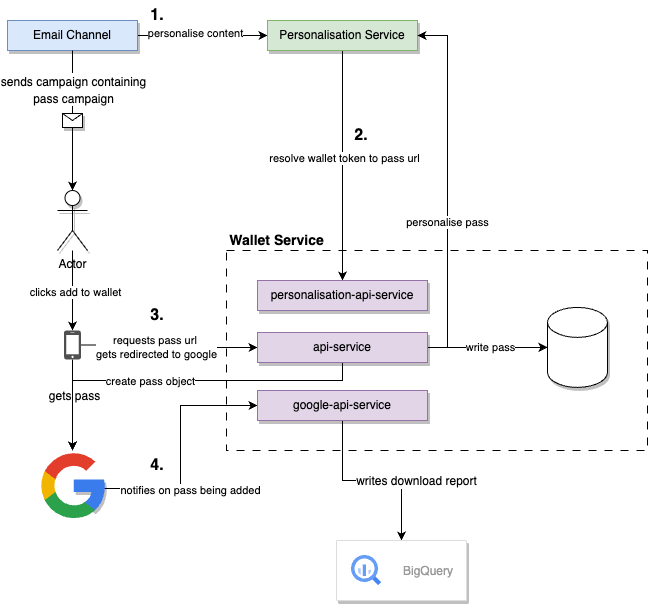
During campaign creation a so called Class is created in the Google Business Console which is then used as a template when the pass-objects are created.
Distributing the Campaign
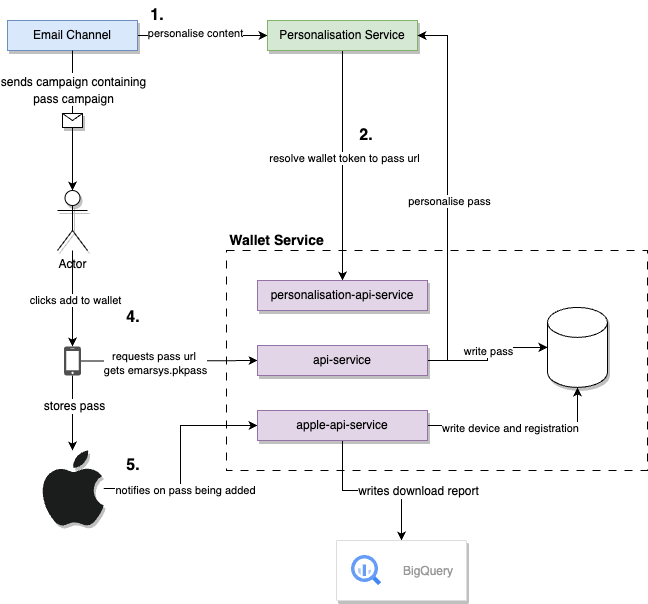
The distribution of the passes starts in other channels e.g. email. In an email campaign it’s possible to include a personalised wallet token. On the mail generation this token will be evaluated to a URL which is pointing to the /api/pass/create/:jwt endpoint in the wallet service. Typically this URL would be used as the target of an "Add to Wallet" image. When setting up this token it’s decided which platform is used so typically there will be one image for apple and one for google.
When the token is evaluated by the personalisation service it’s calling the /pers/v1/urls endpoint in the wallet service with a list of URL generation requests.
| This generation of the URL is not validating the data in the requests against the DB. |
Generating a Pass
It’s first when the user opens the URL on the device the actual pass is being created. The services takes the data in the JWT and depending on the platform returns
- APPLE
-
A binary file containing the pass which is opened by the Wallet app.
-
A URL to a google service where the final pass is made available.
| In the case of Google the distribution of the pass is fully managed by Google and the wallet services writes content to a google service |
Database Reads
- campaigns
-
The pass content is read from the
campaignstable and transformed into the appropriate format depending on the platform - wallet_configurations
-
The details needed for creating passes for both platforms. The signing of the
pkpassin case of an Apple pass and writing the pass content to google is read from the config referenced by the campaign.
Downloading a Pass
Apple
When the user adds the generated pass to the wallet app Apple registers the Pass with the wallet service by making a POST request to the /v1/devices/{deviceLibraryIdentifier}/registrations/{passTypeIdentifier}/{serialNumber} endpoint. This registration contains among other things the push-token that can be used to make updates the pass.
Deleting a Pass
Apple
When the user delete a pass from the wallet app Apple notifies the wallet service by making a DELETE request to the /v1/devices/{deviceLibraryIdentifier}/registrations/{passTypeIdentifier}/{serialNumber} endpoint.