Operations & Error Handling
Here you find all the necessary information and references in connection with operations for the entire sending chain (MG and delivery), and in particular for the message generator.
Prerequisites
Some of the following descriptions assume that you have installed the
Google Cloud SDK. A description how to install and
basically use the Google Cloud SDK
can be found here.
|
Do not forget to update your |
Pub/Sub
This chapter describes different methods which are helpful if you need to handle issues related to Google Pub/Sub.
Select the Project
The project can simply be selected/changed using the following command:
gcloud config set project <ems-mobile-engage|ems-mobile-engage-staging>|
Most of the Cloud SDK commands support the |
List Topics or Subscriptions
It is possible to list the data of topics and subscriptions in different formats (the
format and filter options are optional):
gcloud pubsub <topics/subscriptions> list --format="<format>" --filter="<filter>"For example, to list all subscriptions in JSON format, which contain the string
batch in the name, you just need to execute the following:
gcloud pubsub subscriptions list --format="json" --filter="name:batch"If you want to have the result in a table, then just replace --format="json" by
--format="table".
If you just want to have a part of the information in the result,
then you can specify this in the format option. E.g.: --format="json(name)"
Dumping the Content of a Subscription
Sometimes it might be helpful to dump all, or some of the messages contained in a
subscription. Having in mind that the messages are maybe later republished, this
should be done in JSON format and contain at least the data and attributes.
|
When pulling the content of messages in a subscription in JSON format, then the
|
The basic command to dump messages of a subscription looks like this:
gcloud pubsub subscriptions pull <subscription-name> --format="json(DATA,message.attributes)" --limit=<number-of-messages> --filter="<filter>" --auto-ack|
Be careful when you use the |
Example: The following example pulls 100 messages from the subscription named
ak0001-sub which have a publish time greater or equal than 2021-05-30T13:26:00 and
acknowledges the pulled messages.
gcloud pubsub subscriptions pull ak0001-sub --format="json(DATA,message.attributes)" --limit=100 --filter="message.publishTime>=2021-05-30T13:26:00" --auto-ackTo dump the messages to a file, just add a > <filename> to your command. E.g.:
gcloud pubsub subscriptions pull ak0001-sub --format="json(DATA,message.attributes)" --limit=100 --filter="message.publishTime>=2021-05-30T13:26:00" --auto-ack > my-dump.jsonCreate Topics & Subscriptions
The Cloud SDK already offers the possibility to create topics and related subscriptions:
There is even a command for updating the settings of an existing subscription.
Republishing Dumped Messages
It was already described how messages can be dumped. For re-publishing the dumped messages to a specific topic, we have a CLI tool, which can be used to publish the dumped messages to a specific topic. For further information refer to the README file.
Shoveling of Messages
For the "shoveling" of messages, which is in case of Pub/Sub publishing messages contained in
a subscription to another topic, there exists already
a template in the
DataFlow Jobs.
So to setup a "shovel" just do the following:
-
Open the DataFlow Jobs page and select the desired project from the dropdown list (e.g. Mobile Engage or Mobile Engage Staging).
-
Click on "CREATE JOB FROM TEMPLATE"
-
Give the "shovel" a (job) name
-
Select one of the Europe endpoints (preferred Frankfurt) as the "Regional Endpoint", e.g.
europe-west3(Frankfurt)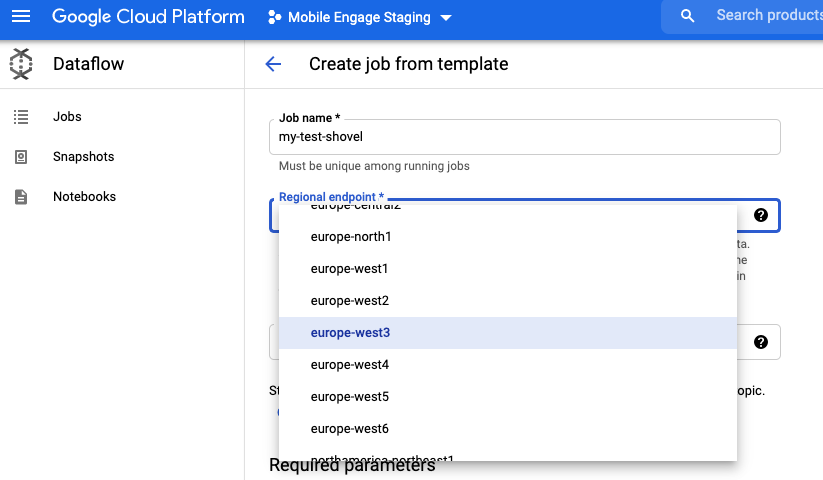
-
Select "Pub/Sub to Pub/Sub" from the "Dataflow template" list
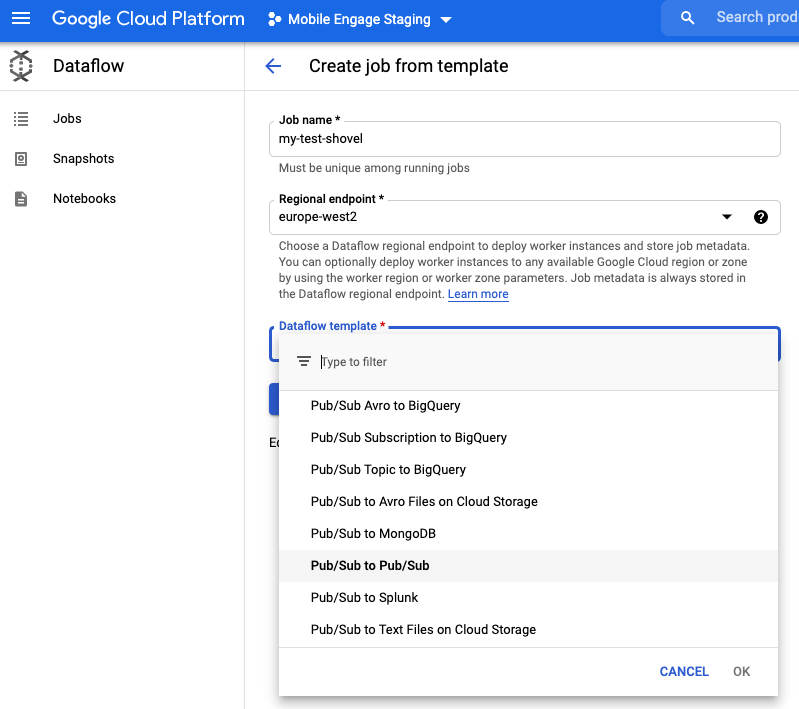
-
Set the full names of the subscription, topic and the name of path to the bucket folder which can be used for temporary storage of data.
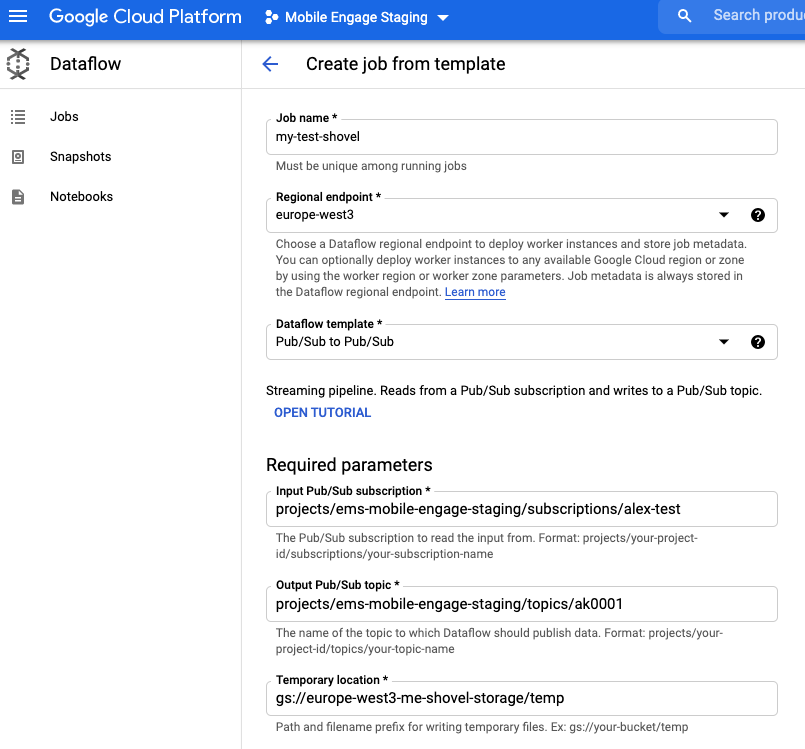
If no such bucket exists, then create one
-
and locate it in the same region as the endpoint (so
europe-west3) and -
set a retention for the data of 5 days.
-
-
Setup optional parameters by clicking on "SHOW OPTIONAL PARAMETERS" if this is desired: Here you could set up a filter based on attributes to select which messages shall be shoveled.
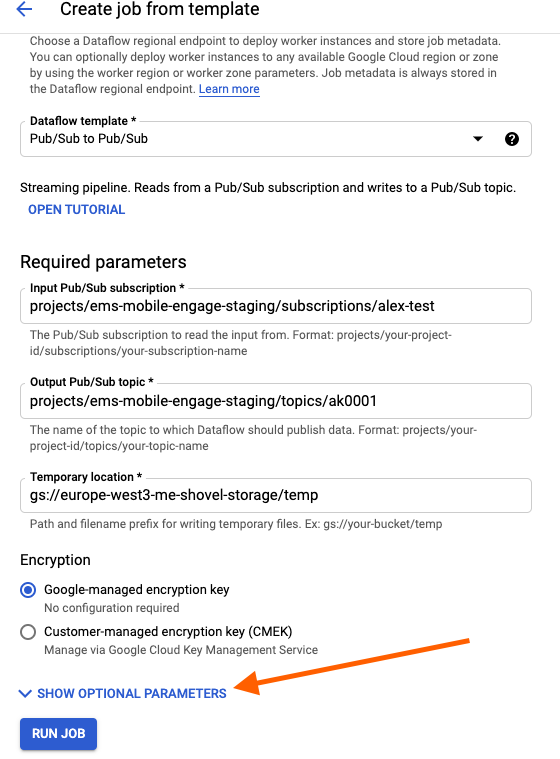
-
Click on "Run job" and you are done.
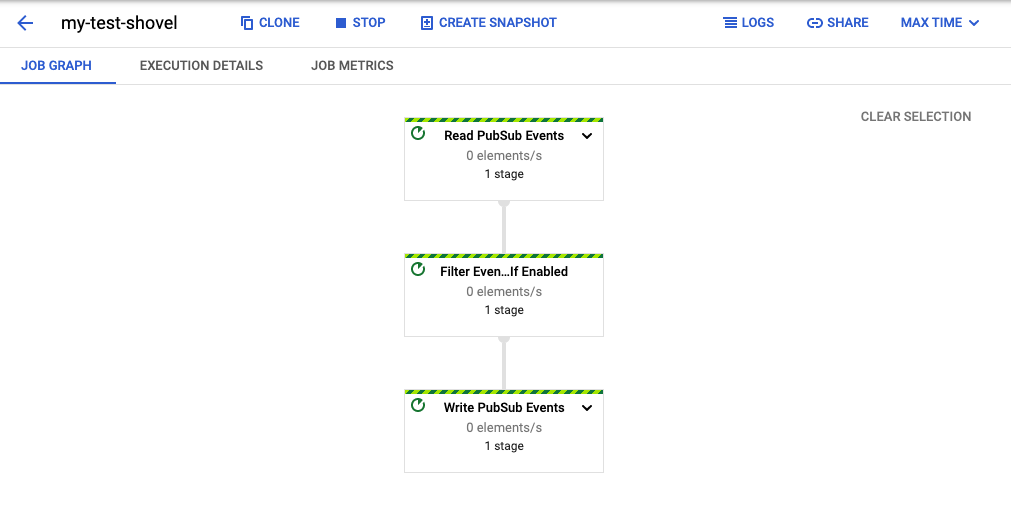
Retriggering a Batch Campaign
Generally spoken, everything what is needed to retrigger a batch campaign is to dump the messages contained in the related subscription and then reduce the messages to the ones which shall be republished and then republish them.
|
Every topic named |
In more detail this means you need to do the following steps:
-
Dump the messages from the backup subscription which are interesting for you:
gcloud pubsub subscriptions pull sending-batch-<dg>-sub-backup --format="json(DATA,message.attributes)" --project="<ems-mobile-engage|ems-mobile-engage-staging>" --filter="NOT message.attributes.chunker-state:*" > batch-requests.jsonThe filter ensures that just the initial messages are contained in the result. You can also consider to extend the filter with a date/time regarding the time frame what is interesting for you.
-
Optionally edit the JSON file and remove entries you do not want to be republished
-
Trigger the republishing as described in the Republishing Chapter.
|
The |
Batch Throttled Campaign Runtime Exceeded Without Consuming Audience
A batch throttled campaign can be setup for push or web push campaigns. Data about BullMQ jobs that are created is stored in the message generator PostgreSQL db, more specifically in the table campaign_audience_inventory.
For each throttled campaign audience is stored in the corresponding table for each run campaign_audience_<customerID>_<campaignID>_<campaign_audience_inventoryID>. And upon consuming chunk of the audience, that chunk is stored in the campaign_utilized_audience_<customerID>_<campaignID>_<campaign_audience_inventoryID> table.
Every day cleanup job is running to remove these tables that are already fully consumed. However, if a campaign exceeds the runtime deadline which is controlled by ENV variable SLICER_THROTTLED_MAX_CAMPAIGN_RUNTIME and audience that is supposed to be utilized does not match audience_size in the inventory table an alert will be raised.
To start investigating what is the root cause of this you can look into the inventory table.
SELECT * FROM campaign_audience_inventory WHERE id = <ID>;Check audience_size and count of utilized audience from utilized_audience_table column there should be difference.
SELECT COUNT(1) from campaign_utilized_audience_<customerID>_<campaignID>_<campaign_audience_inventoryID>;Look at the time created_at for this inventory that is when the first job started. What is in the logs from this point in time? Was message generator Redis up, was it restarted? Is there anything in Pub/Sub error subscriptions regarding this campaign?
| Generally you should check what is expected for a normal batch run apart from checking if there was any Redis related issue. |
Are there any issues causing a slow-down?
-
First check in the Slack channel
#war-roomif there is an issue reported -
Generally we should check if we have issues with one of the services we use in our sending chain. Therefore, check the depth of our Pub/Sub subscriptions. If you see a lot of messages and possibly related alerts, then you should check the logs of the message generator and logs of delivery in LaaS. If a transient error occurs we log the reason and so you can find out what is currently blocking us.
Report to TCS (see here) about your findings and get in contact with the team which is responsible for the service and mention it also in the Slack #war-room.
Is there a backlog in any of the queues the sending chain is using?
To find the distribution group for a customer:
-
In the metadata query result you see the distribution group.
-
Check the subscriptions which are related to this distribution group.
Marking inventory as done
If there is nothing more to do with this particular run you can mark inventory as done by executing. Make sure you notify team responsible for the service before doing it so that they are aware of the manual cleanup. You can do so for example in #team-mobile-dev channel where we usually notify.
UPDATE campaign_audience_inventory SET is_done = true WHERE id = <ID>;