Anonymous Contact Deletion for Mobile Engage and Web Push
Description
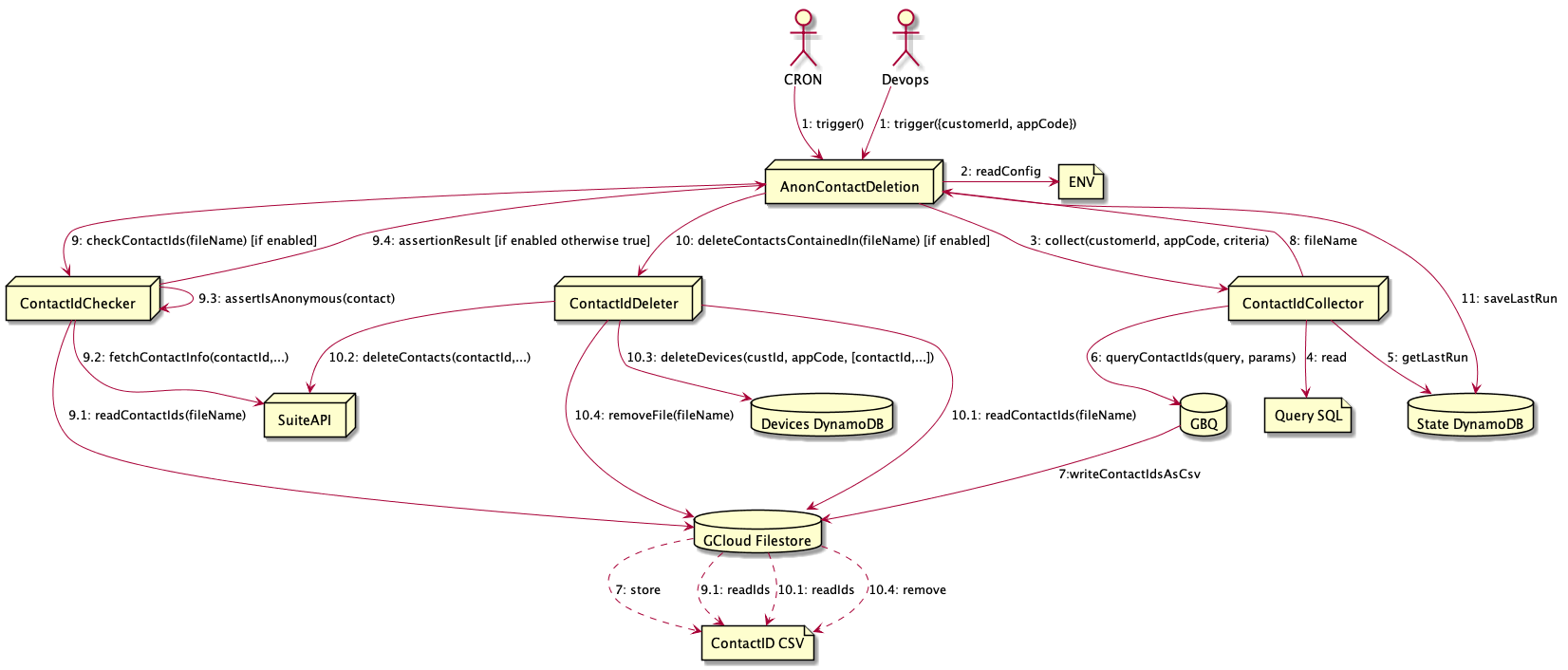
The anonymous contact deletion collects the contact IDs of anonymous contacts which match a given criteria and then deletes the contacts from the SuiteDB and deletes all devices which are related to those contacts from our devices DB (DynamoDB) in AWS.
An anonymous contact is created by ME for each device where a login is received without contact
data (no contact field id and contact field value). In this case a new contact is created in the
SuiteDB which has no email, first name and last name (the criteria we apply to ensure a contact is
anonymous before we delete it).
The criteria for the selection of the anonymous contacts is the similar as the criteria which is applied on USS ME segments.
Note that contacts deleted from suite this way will appear in the contact_changes table. Which will lead to these being deleted from all Mobile Engage BigQuery sources eventually, as part of the contact-data-deletion.
As the contact deletion now has to potentially support a big amount of customers and apps, a table (anonymous_contacts_configurations) in the push database (PG) has been created to store those configurations. Similarly, a table (web_push_anonymous_contacts_configurations) exists, to store deletion configurations for Web Push apps. The data in these tables is structured in a way so default configs get overridden by more specific configs, up to app-code level granularity. This is to ensure there is always a default fallback config for any app that may be created in the future. These are the type of configs, with the latest fallback last are:
-
App Code Specific (has both, an appCode and a customerId)
-
Customer Default (has no appCode, but has a customerId)
-
System Default (has no appCode or customerId)
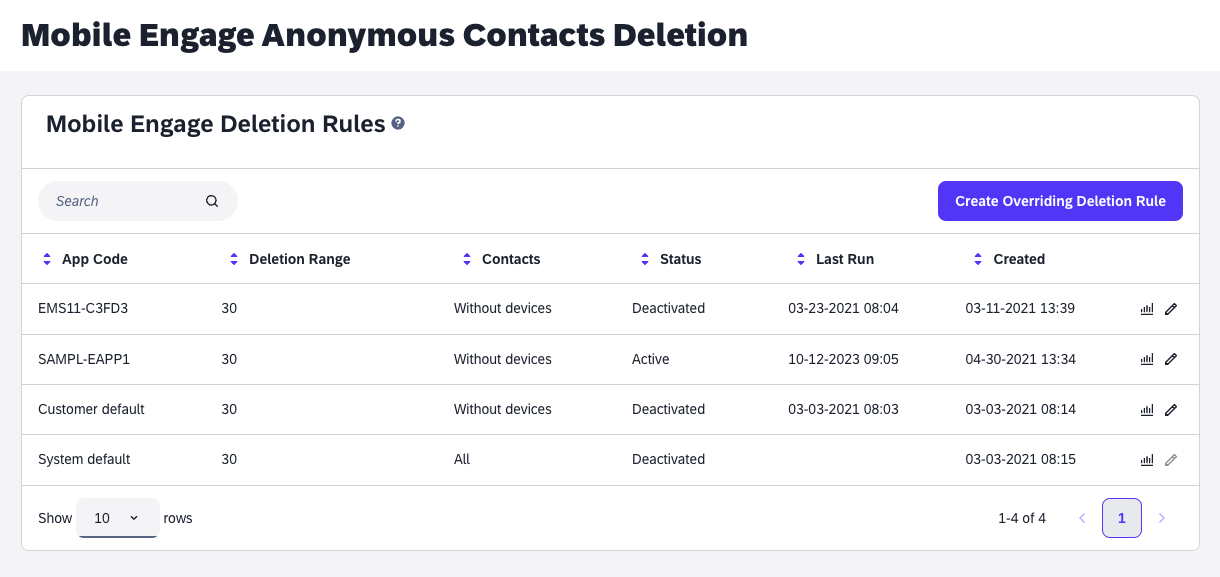
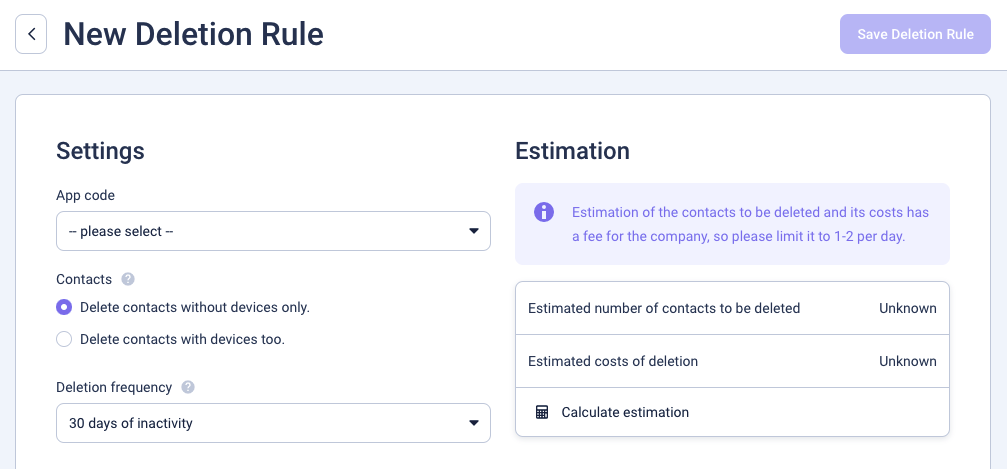
Managing the data in this table can be done through a UI in ems admin. To navigate to this UI you need to select: 'Customer Integrations' > enter the customer you want > find the 'Mobile Engage' integration > Select 'Anonymous contacts config'
Similarly, you can find the Web Push configurations UI under the Web Push integration: 'Customer Integrations' > enter the customer you want > find the 'Web Push' integration > Select 'Anonymous contacts config'
Should you encounter a permissions error on this page, it is highly likely that your admin_id still needs to be added to the whitelist of admins that can access this page in the env of push-notification service. The env var for this is called ADMIN_UI_ACCESS_USERS. You can find your admin_id in the url of the 'Anonymous contacts config' page.
Enabling contact deletion for a new customer
As described above a customer rule can be added to override the default rule, or an app specifc rule can be added to override the system as well as the customer default. Under "enabling" we understand adding a customer having deletion of anon contacts enabledin this UI
Production and Deployment
The anon contact deletion cronjob code is deployed as part of me-push-service. It is ran on production every day at 9AM CET for Mobile Engage and at 1PM CET for Web Push respectively. The cronjobs are called:
me-push-anon-contact-deletion
me-push-web-push-anon-contact-deletion
Once these cronjobs are triggered, they will ingest the whole anonymous_contacts_configurations/web_push_anonymous_contacts_configurations tables in the push PG database. For each customer, it will execute the rules as specified, and queue up the contact_ids in batches, (size configurable using env var ) using Pub/Sub, to be deleted from suite.
These deletions are then processed by a separate worker in the me-push-service (me-push-anon-contact-deletion-worker), which sole purpose it is to delete contacts from suite through the Suite API (for both ME and WP).
Database schema
The table with the configurations can be found in the postgres database of the me-push-service.
Configuration types
Note that if you do not find the configuration for the desired app, to first check the customer wide configuration. You can identify the configuration type using the type column:
-
Global Configuration:
default -
Customer Default Configuration:
customer -
Application Specific Configuration:
application -
Single Run Configuration:
single_run
Note that single_run are used to delete all anonymous contacts as part of the anon-less-flow feature (i.e. turning off anonymous contact creation in the application settings). These configurations will not be run again after the last_run_at is set.
If these columns are not set, alternatively you can identify the configuration types in the following way:
-
Global Configuration: customer_id is null
-
Customer Default Configuration: application_code is null
last_run_at column
This column is used to determine when the last time was this configuration was evaluated or processed by the anonymous deletion cronjob. This cronjob is configured to run daily (at the time of writing 7:00 UTC for ME and 11:00 UTC for WebPush). If you suspect an issue with the cronjob, checking this column is a good first step to see whether a config which should have been evaluated today, actually was. Note that this column is also used in the resulting BQ queries to set the _PARTTIONTIME. Therefore, be aware when setting this column manually, that setting it to null for a large customer might lead to a lot of unnecessary deletion requests to suite.
Reporting
The number of deleted contacts per customer are logged into LAAS (only stored for a couple of days) and BigQuery (stored indefinitely). You can find the data contatining deletion numbers in BigQuery under the 'anon_contact_deletion' or the 'web_push_anon_contact_deletion' datasets. There’s also a DataStudio report based on the BigQuery tables for both, staging and production environments: staging prod.
Alarm Handling
There are two possible alarms which can be triggered by the Elastalert monitoring:
-
Script was not triggered
-
Error during execution of the script occurred
Script was not triggered
You can verify the last time the anonymous contact deletion configurations have been evaluated by looking at the latest last_run_at in the database.
SELECT MAX(last_run_at) FROM anonymous_contacts_configurations WHERE type IN ('default', 'application', 'customer');

SELECT MIN(last_run_at) FROM anonymous_contacts_configurations WHERE type IN ('application', 'customer') AND delete_contacts=true;
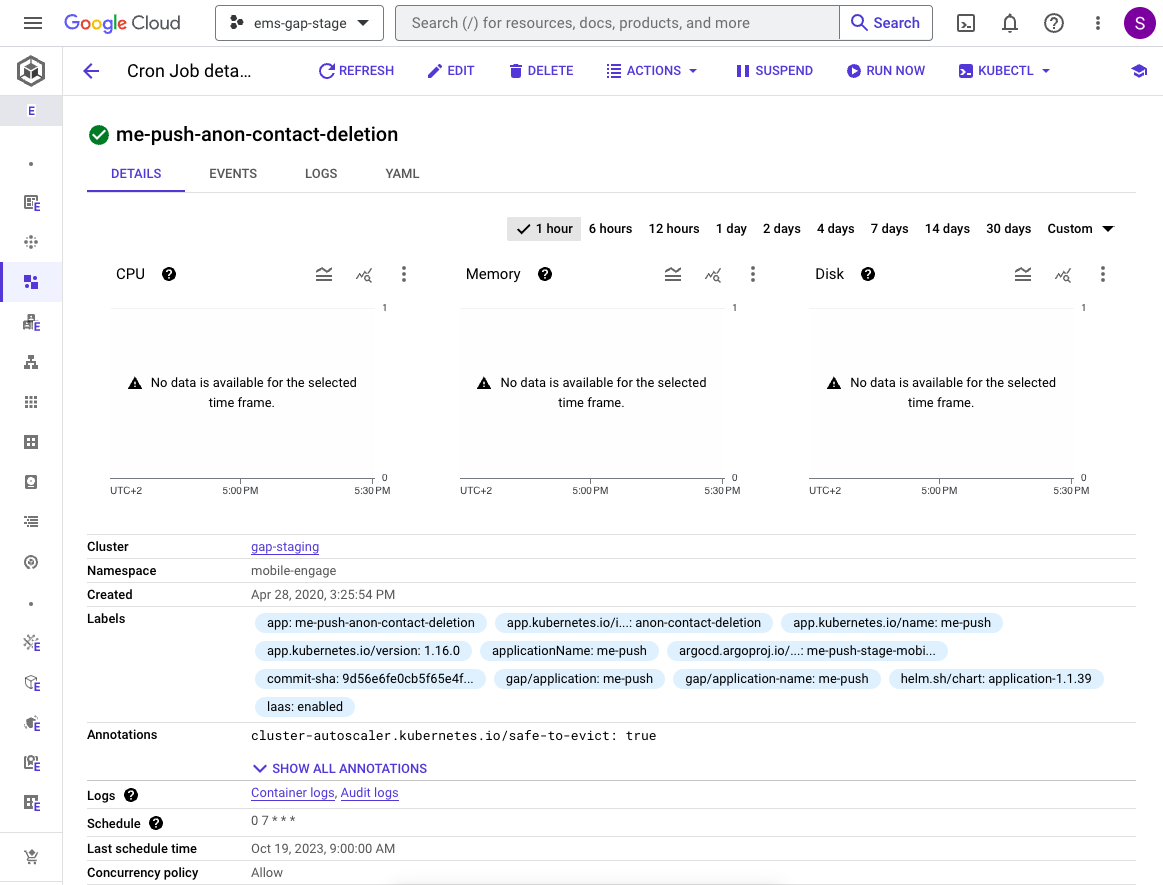
If the above queries do not indicate today’s date, it is safe to assume that there was an issue with the cronjob execution. In this case simply trigger the run manually using the GCP web UI here (or your favourite k8s client (k9s, lens, etc.)).
Simply find the anon deletion cron job by searching for me-push-anon-contact-deletion for the ME anon contact deletion or me-push-web-push-anon-contact-deletion. Select the configuration, and then Select Run Now a the top of the window.
Error During Execution
An error or multiple warnings occured during the execution of the anonymous contacts configurations. In this case there is no real advice to give except to investigate and resolve the issue. Check LAAS2 surrounding logs of the alert, to get an idea what the deletion job was up to before/as it failed or errored. The link in the PD alert should link to the correct index in LAAS2, we recommend lowering/removing the level filter to see the surrounding info logs.
Did k8s restart the worker pod after the error? If not then a retrigger is definitively needed. Did the anon deletion keep running after the error? If not then a retrigger is definitively needed. If the job is running, or finished successfully, then it is likely, there is nothing to do here, and you can resolve the alert.
You can find the cronjobs in k8s, in the mobile-engage namespace:
me-push-anon-contact-deletion for the ME anon contact deletion or me-push-web-push-anon-contact-deletion for the Web Push anon contact deletion. Simply re-trigger it using your favourite k8s client (k9s, lens, etc.).
If the deletion keeps crashing while processing a certain config, this troublesome config can be disabled, either in the UI or in the table.
UPDATE anonymous_contacts_configurations SET delete_contacts=false WHERE id=<affected-config-id>If you suspect that the last_run_at was updated even though the configuration did not get processed successfully, you can reset this flag. Be aware that this is used in the resulting BQ queries to set the _PARTITIONTIME. Setting this to null can force a full re-evaluation of all anon contacts of the customer.
UPDATE anonymous_contacts_configurations SET last_run_at='2023-06-01T00:00:00.000Z' WHERE id=<affected-config-id>

UPDATE anonymous_contacts_configurations SET last_run_at=NULL WHERE id=<affected-config-id>