Architecture
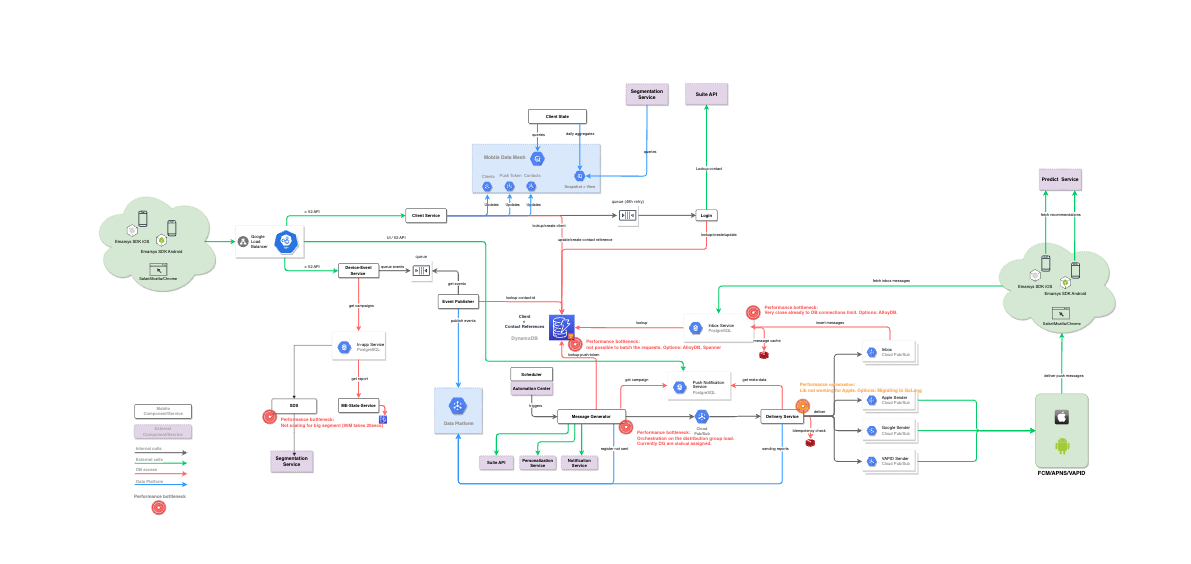
2 primary functions
-
Delivering mobile adapted messages (push, inapp, inbox)
-
Collecting mobile user behavior information
Device Registration
The device registration is involved in the process of establishing the initial connection between a specific device and a Suite contact. Therefore the device registration is executing the following steps, assuming that a user already has installed an app on his device:
-
The user starts the application on his device.
-
If the app was never connected to Mobile Engage it sends a respective login event to the Device Registration.
-
The Device Registration is assigning a Mobile Engage ID (
me-id) to the device and queues the login request for further asynchronous processing before it returns theme-id. The SDK stores theme-idand will use it in subsequent requests. -
The Device Registration processes the login tasks. The processing is dependent on the presence of further user related data which makes it possible to relate a Suite contact to a device. Dependent the presence of the mentioned information the login is done in 2 ways:
-
Anonymous: The app user has not yet provided the information, which would make it possible to relate the user to a contact which belongs to the customer which provided the app. In such a case, the Device Registration creates an anonymous contact which is assigned to the device if no such contact already exists.
-
Personalized/Identified: The app user has already provided the information which makes it possible to make a relation between a contact in the Suite DB and the device. In such a case, the Device Registration only stores the relation between the contact and the device and releases the connection to an anonymous contact (if such a connection exists).
-
Behavior Data Collector
<TODO> This part is responsible for handling events which are triggered by devices after a login has been performed. The events can be
-
system (Mobile Engage) related (internal) events or
-
custom events which are defined by the customer.
The events are received via respective API endpoints (of different API versions):
-
v2-Endpoints using the Push service endpoints:
-
System Events: E.g. login, logout, push token changed,…
-
Message Open Events: A user opened a specific message
-
Custom (User) Events: The app informs ME about a specific action which was performed by a user of the app
-
-
v3-Endpoints using the DES endpoints:
-
Custom (User) Events: The related events are received via the v3 instead of v2 endpoints if the customer has enabled the Inbox and Inapp services.
-
Inapp Click: A user clicked on something within the application (in (the) app → inapp)
-
Also check Event publisher service for the type of events that are used by the system.
Inbox Service
The inbox service gives customers the possibility to communicate to their users before they have a push token. Basically the service provides a kind of inbox for messages similar to an email inbox and the app of the customer can query the content and work with badges and tags via respective API endpoints (for detailed information refer to the process description).
-
Inbox is User Centric: This means there is a single inbox per contact/user. So the content which is shown is the same for all logins a single user has.
The inbox supports tagging of the messages. With this feature it is possible to model any message workflow without the need of a code change because each customer can define the tags by his own. There are also predefined tags which can be used by the customer.
In case of iOS it is possible to send silent push messages to a device, which are used by the app to update the badge count and indicate visually that there is new information. For Android no such concept exists, so the problem has to be resolved by the developer of the app (i.e. the customer). It is clear that a silent push only can be used as soon as the related user has a push token.
Inapp Delivery
The Inapp service is mainly responsible for controlling the display of user related campaign information on a device, based on events which were produced by the user while using the app.
It also serves as the backend logic for the UI (through the push service proxying it).
So the service depends on events which have been produced "in the app" → "Inapp".
The biggest challenge for this service is the prompt delivery of content as soon as it is requested by an app. To achieve this, the service does not generate content on request. Instead it forwards already prepared content, based on selection criteria which can be defined by the customer (display when, display frequency, when to stop,…). Because a single user can be involved in more than one InApp campaign of a customer, there is additionally a priority taken into account, if more than one campaign would match the selection criteria.
Whenever the Inapp service has delivered a content for a user, it reports a delivered state for this content. As soon as the service receives the inapp:viewed event from the SDK (indicated the message was rendered) it will appropriately update the state.
Inapp campaigns are long-lived, similar to AC triggered push campaigns. However Mobile Engage can update the segment on a daily basis itself with the use of the SDS
The process path for Batch and Transactional can be found as diagrams on the respective links.
The DES has its own diagram for responding to the SDK. The DES repo.
External Dependencies
-
NodeJS: Most of the parts of ME (front and backend) have been developed in JavaScript using NodeJS for backend services.
-
MongoDB
-
RabbitMQ: Dependent on the part of the ME service, RabbitMQ hosted on CloudAMQP is used.
-
Redis: This key/value store service is used via GCP and Compose.
-
Google Big Query: This https://cloud.google.com/solutions/big-data/platform is mainly used by ME to report any kind of events which are later used by ME itself, other Suite services and for segmentation.
-
Google Pub/Sub: Pub/Sub is used in Push for forwarding and handling of events as RMQ came to its limits. Also the Message Generator replaces certain RMQ paths by Pub/Sub.
-
DynamoDB: Dynamo DB is used for storing client (device or browser) specific information as own DB solutions did not scale and were much to slow for our needs.