Operations
| Mobile engage operations is generally split into daily and on call duty. |
-
The daily duty is happening from Monday to Friday during office hours (09:00 till 18:00) and the
-
The on call duty is happening
-
on Mon, Tue, Wed and Thu from 18:00 of the current day till 09:00 of the next day and
-
from Friday 18:00 till the following Monday 09:00.
-
On Call Duty
The developer who is on call has to make sure that SLAs (TBD) are respected and the ME system is fully functional during out-of-office hours by handling monitoring and support related alerts which are triggered via Pagerduty.
Daily Duty
The developer whos is_on daily duty_ has to (ordered by priority)
-
Make sure SLAs (TBD) are respected by handling our own monitoring alerts and customer escalations (also via alerts) during office hours
-
Take over tasks from night shift if there are left-over unhandled tasks
-
To support our mobile engineers and 3rd level teams with their work troubleshoot our customer’s issues related to bugs in the system (escalated to us via Pagerduty alerts).
-
Respond to questiongs in the
#team-mobile-pushSlack channel-
Aim to respond as promptly as the current workload permits.
-
If a question cannot be addressed immediately or at all, create a corresponding JIRA ticket in the current active "devops" epic.
-
-
Manage Dependabot PRs:
-
Review and merge routine dependency updates.
-
Identify critical updates and create separate tickets for them.
-
-
Enhance the operational efficiency and reliability of the entire Mobile Engage platform.
-
extending operations documentation in case an alert is yet to be documented or incorrectly described
-
removing unused environment variables after making sure its not used
-
creating/improving dashboards on laas/stackdriver
-
creating follow up for fixing broken/useless logs if found during investigation
-
Improve our alerts if necessary
-
Security Updates - Security updates overview in Looker Studio
-
Activation of Developers on Daily and On Call Duty
This chapter describes how a developer on daily or on call duty can get "activated" in case of any issues.
Regarding support requests the rule is applied, that the requests first have to go through the mobile engineer team. If the mobile engineer is not able to resolve the issue, he is allowed to trigger the developer on daily duty. 3rd level support is always allowed to trigger the developer on daily or on call duty.
So the ME developer who is on daily or on call duty can be activated by alarms
-
triggered by our own monitoring systems
-
triggered by mobile engineers via email sent to the proper PagerDuty service
-
triggered by 3rd level support via email sent to the proper PagerDuty service and
-
additionally the developer on daily duty can be activated by questions on the
#team-mobile-pushslack channel.
Activation Channel for Mobile Engineers and 3rd Level Support
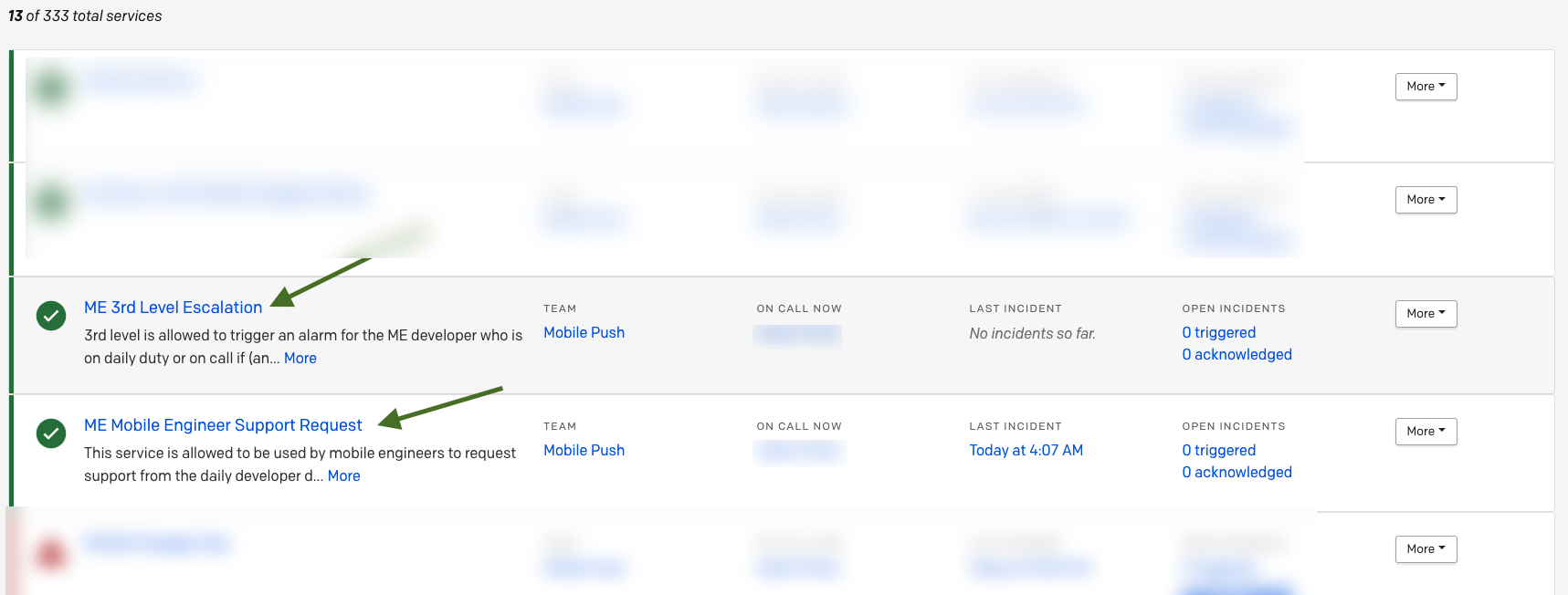
As already described the mobile engineers and 3rd level support have to use Pagerduty in order to activate the developer who is on daily and/or on call duty. Therefore we established 2 services in Pagerduty. The access data for the services was already forwarded to the related teams:
-
The requests from the mobile engineers will only be escalated during office hours from 0900 to 1800. Requests which are received outside of this time are reported on low level and will be escalated when the next daily duty starts (at 09:00 office hours).
-
Requests from 3rd level support will always be handled as high prior (are escalated / trigger an alarm). 3rd level support requests are only allowed for critical issues which are listed in the following chapter.
Critical Issues
The following list of critical issues is only for information purpose in order to be able to check if an alarm coming from 3rd level outside of the office hours is valid.
-
InApp:
-
Messages Not Delivered (does not apply for test messages),
-
Broken or Missing
-
Launch(es) or Campaign(s)
-
-
Duplicated messages
-
-
Push:
-
Messages Not Delivered (does not apply for test messages),
-
Broken or Missing
-
(Personalized) Content
-
Launch(es) or Campaign(s)
-
-
Duplicated messages
-
-
ME Platform:
-
Failed user registration
-